
Zillow 3D Home Tours
Zillow GroupHouse & Home
3.9203.00 Reviews
- Version
- 2026.12.2
- Installs
- 100.00K
- Age Rating
- Everyone
Screenshots
Our Review of Zillow 3D Home Tours
 Analysis by Appyee
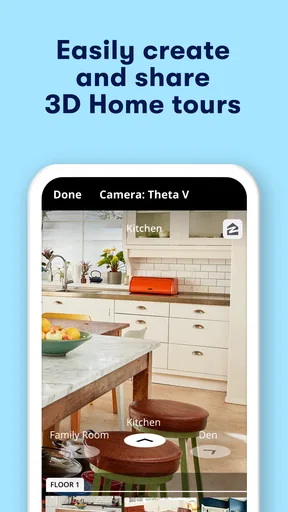
When I first tried Zillow 3D Home Tours, I approached it less like a traditional home-search tool and more like a way to visit a property before deciding whether it deserved a real appointment. That distinction matters. This free House & Home app from Zillow Group is built around virtual tours for real estate, so its strongest value appears when photos leave too many questions unanswered. Instead of judging a room from a handful of carefully chosen angles, I can move through a digital representation of the property and form a better sense of how the spaces connect.
I find that especially useful in a shared household. One person can explore a listing while another watches, then both can discuss whether the layout fits their routine. It is not a replacement for standing in a property, checking its condition, or talking with an agent, but it can make the early stage of house hunting more practical. The app has a 3.9 average from around 700 ratings and has passed 100 thousand installs, which suggests that it has found a real audience without making it seem like every user will have the same experience.
How a shared household can use the tours
A realistic example is a couple searching after work. One person may be interested in the kitchen and storage, while the other cares more about the route from the entrance to the living area or whether a bedroom feels separated from the busiest spaces. With ordinary listing photos, each person may build a different mental picture from the same limited evidence. A 3D tour gives both of them a shared visual reference, making the conversation more concrete.
I would use it before arranging an in-person viewing, not after. A quick tour can help me remove properties that already feel unsuitable, leaving more time for homes that genuinely deserve attention. That is a useful trade-off because visiting every interesting listing is tiring and often involves travel, schedule changes, or coordination with several people. The app is at its best as a screening layer between browsing and committing to a visit.
Shared use also exposes a small but important limitation: the app does not make a household decision for you. It can show the available tour, but it cannot tell you whether a narrow passage will work with your furniture, whether a room receives enough daylight at a particular hour, or whether the neighborhood feels right. I treat the virtual walkthrough as a conversation starter. If someone in the household has mobility needs, for example, the tour may help identify possible concerns, but it should not be treated as a reliable accessibility inspection.
The same approach works for people who are helping a relative move. A family member can view a property from another location and discuss the layout without relying entirely on a description passed along by someone else. That does not turn the app into a remote inspection service, but it can reduce misunderstandings. I appreciate this because real-estate decisions often involve people who cannot all attend the first viewing.
What the first session feels like
The app is most understandable when I open it with a specific property in mind. The central idea is simple: find a listing that offers a Zillow 3D Home Tour, enter the tour, and explore the available spaces. The experience is more visual than text-heavy, so I do not expect it to behave like a full property-management app or a general-purpose home-planning tool.
My first practical tip is to explore in a consistent order. I start at the entrance if the tour provides that perspective, then move through the main living areas, bedrooms, bathrooms, and less prominent spaces. This prevents the attractive opening view from dominating my opinion. A repeatable route also makes it easier to compare several homes because I am looking for the same kinds of details each time.
I also pause rather than rushing through every room. The useful information is often in the relationship between spaces: whether the dining area seems to sit directly beside the kitchen, whether a bedroom opens onto a busy central zone, or whether storage appears to be concentrated in one part of the home. These are not measurements, and the tour should not be mistaken for a floor plan, but the spatial impression can still be more informative than static images.
There is a second tip that is easy to overlook: use the tour to create questions for the eventual viewing. If I notice an unusual transition between rooms, an apparently small doorway, or an area that is difficult to understand from the camera position, I write it down. The virtual visit is then doing more than helping me say yes or no. It is preparing a focused checklist for the in-person visit.
Keeping setup expectations realistic
Because this is a free app with an Everyone content rating, it is approachable for a broad household. Its current version is 2026.12.2 and it requires an operating system version of 10 or later, so device compatibility is the first practical boundary to consider. A family sharing one older phone or tablet should check that the device can run it before planning a group browsing session.
That age rating describes the general suitability of the app, not the maturity of every property decision made through it. A young person may be able to look at a tour, but an adult should still handle questions involving contracts, finances, identity, or contact with real-estate professionals. I would not hand a child responsibility for evaluating a home simply because the interface is easy to understand.
On a shared device, I prefer to keep the activity clearly separated from other household tasks. If several people are comparing homes, we can agree on which listings to inspect and record our reactions separately before discussing them. That avoids a confident first opinion steering everyone else. The app provides the visual material; the household still needs its own method for making a fair decision.
Account boundaries deserve similar attention. I would not assume that one person’s account, saved activity, or browsing context should automatically be used by everyone else. If the device belongs to a household rather than one individual, each person should be clear about who is viewing properties and who is responsible for any follow-up. I find this especially important when a shared tablet is also used for personal browsing, because confusion about ownership can lead to the wrong person thinking a property has already been reviewed or rejected.
I also recommend avoiding rushed conclusions during a group session. Virtual tours can feel immersive, and that can create a false sense of certainty. A home may appear spacious because of the camera position, or less appealing because a particular room is presented awkwardly. I use the tour to compare layouts, not to make a final judgment about condition, sound, temperature, surroundings, or the feeling of being there in person.
Coordinating decisions without losing useful detail
The strongest household workflow I found is simple: shortlist, tour, note, compare, then visit. First, we choose a small set of properties. Next, each person explores the available 3D tour independently or together. After that, we write down one reason to continue and one question to investigate. Only then do we compare impressions.
This method helps prevent a common problem with property searches: one memorable room can overshadow the rest of the home. Someone may love the kitchen while missing that the bedrooms are arranged in a way that does not suit the household. Someone else may dislike the decoration even though the underlying layout works well. By separating observations from preferences, the tour becomes more useful for coordination.
For remote family members, I would share the listing information through the household’s usual communication method and discuss the tour at an agreed time. I would not treat a virtual walkthrough as proof that everyone has seen the same thing. People notice different details, and camera movement can make one person feel oriented while another feels lost. Asking each viewer to mention the rooms they checked is a small step that keeps the conversation grounded.
Another non-obvious use is preparing questions for an agent before making contact. Instead of sending a vague message such as “Can you tell me more about the house?”, I can ask about the areas that seemed unclear in the tour. That may include the connection between two rooms, the apparent location of storage, or whether a space shown from one angle has another entrance. The app does not provide those answers by itself, but it helps me ask better questions.
There is a trade-off here. A virtual tour can make coordination faster, yet it may also encourage too much discussion before anyone verifies the basics. I would still check the listing details, location, availability, and viewing arrangements through the relevant property source. The tour is a visual aid, not a complete record of everything a household needs to know before spending time or money.
Trust, privacy, and the age context
I am comfortable recommending the app for general household browsing because the content rating is Everyone and the purpose is straightforward. Still, “appropriate for everyone” does not mean that every listing or conversation is equally suitable for every age. Children can look at rooms and talk about what they like, but adults should explain that a virtual property tour is not a promise that the home is available, affordable, safe, or exactly as it appears online.
Trust is also about how much confidence I place in the digital presentation. A tour gives me a more connected view than a photo gallery, but it remains a presentation of a property. I cannot use it to verify construction quality, odors, noise, temperature, nearby traffic, or the condition of surfaces that are outside the camera’s useful view. Even the most convincing walkthrough has a boundary: it shows what the tour captures, not everything a human visitor can notice.
For that reason, I would be cautious about letting a young user contact an agent or property owner independently. The app itself may be suitable for browsing, while the next steps involve personal information and real-world arrangements. Adults should guide those steps and decide what details are appropriate to share. This is not a criticism of the app; it is simply the difference between viewing a home and entering a property search process.
On a shared device, I would also avoid assuming that everyone wants their browsing choices visible to everyone else. A household may be working together, but individual preferences can still be personal. Agreeing on how listings are discussed is more useful than expecting the app to manage family roles. I did not find a reason to treat it as a dedicated family-control product, so its value depends on ordinary household communication and sensible supervision.
The trust question becomes even more important when a property is being considered from far away. A remote viewer may feel that the 3D tour gives enough information to skip a visit. I would resist that temptation unless a trusted person can inspect the home on the household’s behalf. The app can narrow the search and support a conversation, but it should not carry the full burden of a major housing decision.
Where it beats ordinary alternatives, and where it does not
Compared with a normal photo gallery, the app’s clear advantage is continuity. Photos isolate rooms; a virtual tour helps me understand how those rooms relate to one another. That difference is valuable when choosing between open-plan and separated layouts, estimating how a household might move through the property, or explaining the home to someone who was not present at an initial viewing.
Compared with a video walkthrough, the 3D approach can feel more exploratory because I am not limited to the exact sequence chosen by the person recording the video. I can spend more time on a room that matters to me and less time on a decorative feature I do not care about. However, a well-made video may communicate atmosphere, sound, or a guided explanation more effectively. If I need context rather than navigation, video can be the better companion.
Compared with an in-person visit, the app is cheaper in time and effort but weaker in verification. It cannot replace walking through the doorway, checking proportions with my own body, noticing the surrounding environment, or asking immediate questions. I see the app as the best option for deciding which homes deserve a visit, not for eliminating visits altogether.
It is also not the right choice for someone looking for a complete home-buying workflow. The focus is the virtual tour, so I would not install it expecting budgeting tools, moving checklists, renovation planning, or a substitute for professional advice. People who already have a shortlist and need detailed financial or legal guidance will need other resources alongside it.
One of my favorite trade-offs is that the app can reveal layout problems while hiding physical ones. That makes it unusually helpful for spatial judgment but less useful for judging wear, materials, or the sensory experience of the property. I would use it when the question is “Could this arrangement work for us?” and switch to an in-person inspection when the question becomes “Is this home actually in acceptable condition?”
Who should install it and who should skip it
I recommend Zillow 3D Home Tours to renters or buyers who are comparing several properties, especially when household members cannot attend every early viewing. It is also useful for anyone who struggles to translate a photo collection into a sense of movement through a home. The ability to revisit spaces and discuss them together gives the app a practical role beyond casual browsing.
I would be more cautious about recommending it to someone who expects every listing to offer the same depth of virtual exploration. The experience depends on the tour being available and useful for the property being considered. If a particular home has limited visual coverage, the app cannot fill in the missing information. In that situation, ordinary listing details, a video, or a direct appointment may provide a better next step.
People who need exact dimensions should also avoid relying on the tour alone. I can form a rough impression of scale, but I would not buy furniture, plan a renovation, or make an accessibility decision from visual navigation without confirming measurements through a dependable source. This is one of the clearest limits, and ignoring it could turn a helpful preview into an expensive mistake.
For a household with a shared phone or tablet, the app is worthwhile when everyone agrees on how it will be used. One person can lead the tour, another can keep notes, and a third can challenge assumptions. If nobody wants to compare properties carefully and the goal is only to glance at listings, a standard browser or photo view may be quicker. The app earns its place when the extra spatial perspective changes the quality of the discussion.
My household verdict
After using it as a property-screening tool, I see Zillow 3D Home Tours as a focused and sensible addition to a real-estate search. Its free price removes an obvious barrier, and the Everyone rating makes it comfortable for general family browsing. The developer, Zillow Group, has kept the idea centered on a practical question: can I understand a home’s layout better before investing time in a visit?
My answer is yes, with an important qualification. I would use it to eliminate poor matches, prepare sharper questions, and coordinate opinions among people sharing a housing decision. I would not use it as a substitute for checking facts, confirming dimensions, assessing condition, or visiting the property. That balance is what makes the app useful rather than misleading.
The best result comes from treating the tour as evidence, not a verdict. Explore methodically, note what remains unclear, compare impressions without letting one person dominate, and reserve final trust for information that has been checked in the real world. For shared household planning, its real strength is turning a vague impression into a common conversation. If that is what you need, this app is worth trying; if you need a complete property transaction or a professional inspection, it should remain one part of a broader process.
With its release on October 26, 2020, and continued availability in version 2026.12.2, it has had time to settle into a clear role rather than trying to be everything at once. I would keep it on my device during an active home search, particularly when several people need to coordinate from different places. Once the shortlist is ready, I would put the phone away, visit the strongest candidates, and let the physical property have the final word.
Verdict
Strengths of Zillow 3D Home Tours
- Immersive 3D walkthroughs make it easier to understand a home's layout remotely.
- Interactive floor plans help compare room sizes and overall flow.
- Useful for buyers who cannot attend an in-person viewing immediately.
- Tours can reveal details that standard listing photos may overlook.
- Simple navigation lets users move between rooms at their own pace.
Limitations of Zillow 3D Home Tours
- Tour availability depends on whether the listing includes Zillow 3D Home content.
- Large virtual tours may load slowly on weaker mobile connections.
- Some tours can feel less accurate than visiting the property in person.
- Image quality and coverage vary between homes and camera setups.
- The experience offers limited insight into noise, odors, or neighborhood conditions.
Other Releases by Zillow Group
View All
Zillow: Homes for Sale & Rent
House & Home4.8

Apartments & Rentals - Zillow
House & Home4.8
Similar Picks in This Category
View All
Universal TV Remote Control
CodeMatics Media Solutions3.9

AlfredCamera Home Security app
Alfred Systems Inc.4.7

Planner 5D: AI Home Design
Planner 5D4.5

Universal Tv Remote-Cast to TV
One Music Player4.1
Zillow: Homes for Sale & Rent
Zillow Group4.8

99acres Buy/Rent/Sell Property
infoedge.com4.3
Frequently Asked Questions
What is Zillow 3D Home Tours, and what can I use it for?
Zillow 3D Home Tours is a property-viewing feature that lets users explore homes through interactive virtual tours, including panoramic rooms and, on supported listings, floor-plan views. It is useful for browsing properties remotely, comparing layouts, and getting a better sense of a home before scheduling an in-person visit. However, tour availability depends on the listing and the technology used to create it.
Do I need a Zillow account to view 3D Home Tours?
In many cases, you can open and explore a Zillow listing’s 3D Home Tour without creating an account, especially when accessing a shared tour link or browsing publicly available listings. An account may still be helpful for saving homes, receiving alerts, and managing your property searches. Some features, contact options, or personalized tools may require signing in, so requirements can vary by device and region.
Can I create a Zillow 3D Home Tour for my own property?
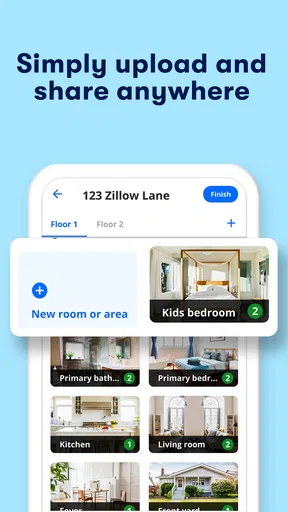
Property owners and real estate professionals may be able to create a 3D Home Tour using compatible capture tools and Zillow-supported services. The process generally involves scanning or photographing the property room by room, processing the images, and attaching the finished tour to a listing. Availability, equipment requirements, processing times, and publishing options can change, so users should check Zillow’s current instructions before starting.
Does Zillow 3D Home Tours replace visiting a property in person?
No. A 3D tour is helpful for understanding a home’s general layout, room connections, and visual condition, but it cannot replace an in-person inspection. Camera angles, lighting, wide-angle lenses, furniture, and outdated scans may make rooms appear different from reality. Before making an offer or signing a lease, it is wise to visit the property, verify measurements, and arrange professional inspections when appropriate.
What should I do if a Zillow 3D Home Tour does not load or looks inaccurate?
If a tour fails to load, first check your internet connection, update the Zillow app or browser, and try opening the listing again. Older devices may also struggle with interactive panoramic content. If the tour appears incomplete, blurry, or inconsistent with the listing, it may have been created with limited coverage or may no longer reflect the property. Contact the listing agent or Zillow support for clarification.
